


Sign it yourself.
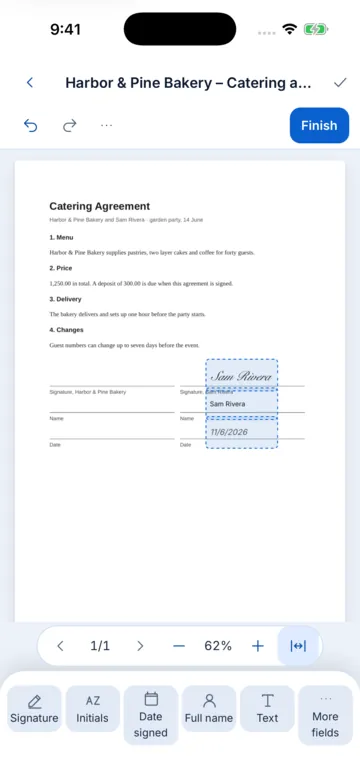
Open a PDF or scan, add your details and signature, then save a completed copy. Local signing works offline after installation.
Import→Sign→Export
Free · One sign-in; files stay localSign a document →YOUR DOCUMENTS. YOUR NEXT STEP.
Sign it yourself. Send it to someone else. Use it again.
Everyday agreements, without the runaround.
Opens in your browser. Free to start, no card needed. Sign in once with your email. See how it works ↓
THREE JOBS. ONE SIMPLE PLACE.
It starts with what you need to do, not which plan to buy.
Open a PDF or scan, add your details and signature, then save a completed copy. Local signing works offline after installation.
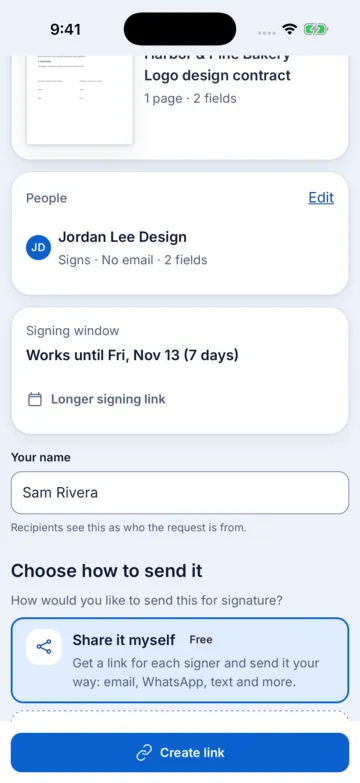
Prepare the fields and share a secure link yourself. Or use a delivery credit for SignBento to send invitations and reminders.
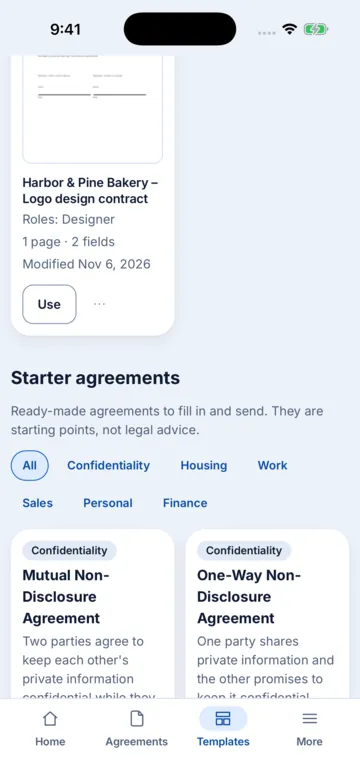
Keep reusable templates for recurring forms. Start a fresh agreement without carrying over someone else’s signatures or details.
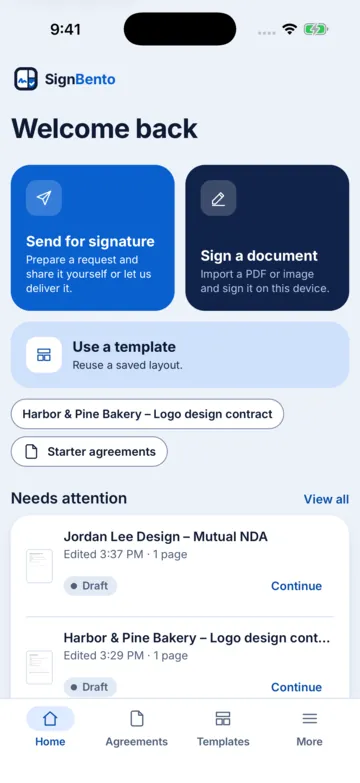
SEE THE APP
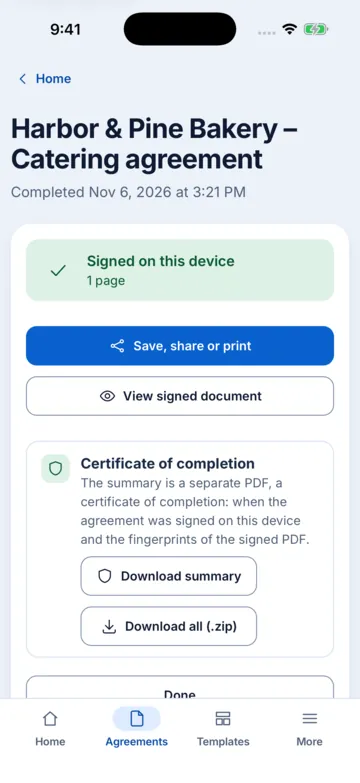
The same app on your phone and in your browser. These are screens from the iPhone app, with made-up sample data.
LOCAL FIRST. CLEAR ABOUT THE CLOUD.
Keep everyday signing on your device. A document goes to the service only when you send it for signing, publish a copy or set up an encrypted account copy.
Read the privacy policy ↗Local documents, signatures and templates stay on your device. They are never uploaded automatically.
Remote signing uses temporary storage. Download the completed file and its evidence before the window closes.
Items you publish to your AI workspace live in a separate copy. Stored until you delete it.
Signing in restores your purchase and your workspace copies. Local-only files need a backup, an account copy or device transfer.
CONNECT YOUR AI TOOLS
SignBento works as an MCP server. Connect your AI tool and ask it to find an agreement, check who has signed, or prepare a new request from a document you give it. Nothing goes out until you review and approve it in SignBento.
Or add SignBento by URL in any AI tool that supports remote MCP servers with sign-in. Included in Free and Lifetime.
Connect your AI tools →Send the mutual NDA to Alex for signature.
I prepared a request from your NDA for Alex Rivera, with one signature field. Review and approve it in SignBento to send it.
SIMPLE PRICING
US pricing. Start free, then a one-time upgrade when managed deliveries matter.
SIGNBENTO FREE
For everyday signing and occasional sends.
Share links yourself using the apps you already use.
Start freeSIGNBENTO LIFETIME
ONE-TIME UPGRADEKeep the features. Add deliveries when you need them.
Lifetime is at its launch price for a limited time. The price will go up later.
One credit covers one managed request, including its permitted invitations and reminders. Need more later? Lifetime owners can add an optional one-time delivery pack.
Get Lifetime · $4.99 onceLifetime means a permanent feature unlock—not unlimited managed delivery. Both plans include sender signing before or after the recipient, and the sender never counts toward the signer limit. Basic viewed and signing status remains available in Free.
SIGNBENTO AND DOCUSIGN
Most agreements don’t need a subscription. See what you actually pay to get a few signed.
| Feature | SignBento | Docusign |
|---|---|---|
| Price | Free, or Lifetime at $4.99 once. No subscription. | Subscription. On annual plans: Personal $11 a month ($132 a year), Standard $30 and Business Pro $45 per user a month. |
| What you get | Free: 1 signer per request, 3 active requests. Lifetime: up to 5 signers per request, 25 active requests and 100 delivery credits. Share links yourself, or use credits to have us email them. | Personal: 5 envelopes a month. Standard and Business Pro: 100 envelopes per user a year. |
| Where documents stay | Documents you sign yourself stay on your device and are never uploaded automatically. | Its storage system keeps signed documents and audit trails. Offline signing in its mobile apps syncs when you reconnect. |
Docusign details from its public pricing and features pages, checked 8 November 2026, in US dollars; they can change and may differ by country. An envelope and a delivery credit aren’t the same unit. Docusign is a trademark of Docusign, Inc. SignBento isn’t affiliated with or endorsed by Docusign.
You sign in once with a verified email. Local signing, templates and in-person signing then run on your device. Recipients never need a SignBento account. Remote requests use that same verified sender identity, so the person receiving the document knows who sent it.
Local preparation and self-signing work offline after you sign in once and install the app. Remote signing, delivery, purchases and connected status need internet access.
Yes. SignBento works as an MCP server, so your AI tool can work with your agreements.
To connect, add this server URL in your AI tool: https://mcp.signbento.com/mcp. Then sign in to SignBento and approve the connection. Step-by-step instructions for Claude, ChatGPT, Codex and Claude Code are on the Connect your AI tools page.
What it can do: ask it to find a signing request, check who has signed, or prepare a new request from a document you give it.
You stay in control. Nothing is sent until you review and approve it in SignBento. A document you give your AI tool is kept as a workspace copy once you confirm it, and you can delete it at any time. Your private local files are never uploaded automatically.
Which tools: any AI tool that supports remote MCP servers with sign-in (OAuth). Custom connectors in Claude and ChatGPT depend on your plan with them. Disconnect a tool at any time, in the tool itself or in SignBento under Settings. Included in Free and Lifetime.
Only what you deliberately publish or give your AI tool. Your private vault is never uploaded automatically. A document you give it is kept as a workspace copy once you confirm it in SignBento, and you can delete workspace copies at any time. Deleting one cannot recall what a chat provider has already processed.
The Lifetime feature entitlement remains. You can still share links manually within your plan limits, or choose an optional top-up for managed delivery.
Remote signing storage is temporary. The completed PDF and its evidence stay available for 7 days after completion on Free, or 30 days for a request sent with Lifetime, so save a copy. Items published to your workspace stay until you delete them.
Yes. Use it in the browser, or get the app for iPhone or Android.
The sender app is in English. Recipient signing, invitations and reminders are in English and Spanish.
SignBento is made for everyday business agreements such as NDAs, statements of work, service agreements and project approvals. Suitability still depends on the document and applicable requirements. SignBento does not promise notarization, identity proofing, qualified signatures or legal advice.
SIGNBENTO BY INSTADYN
A simpler way to sign, send and reuse.
No subscriptions. One-time Lifetime when you need more.